HYPERCRATE is a sample library app. It plays every loop you click in your track's key and tempo, so you know it fits before you drag it into your DAW.
Windows, macOS and Linux.3 monthly payments of £26.33. The full app from day one, yours outright after the third payment.
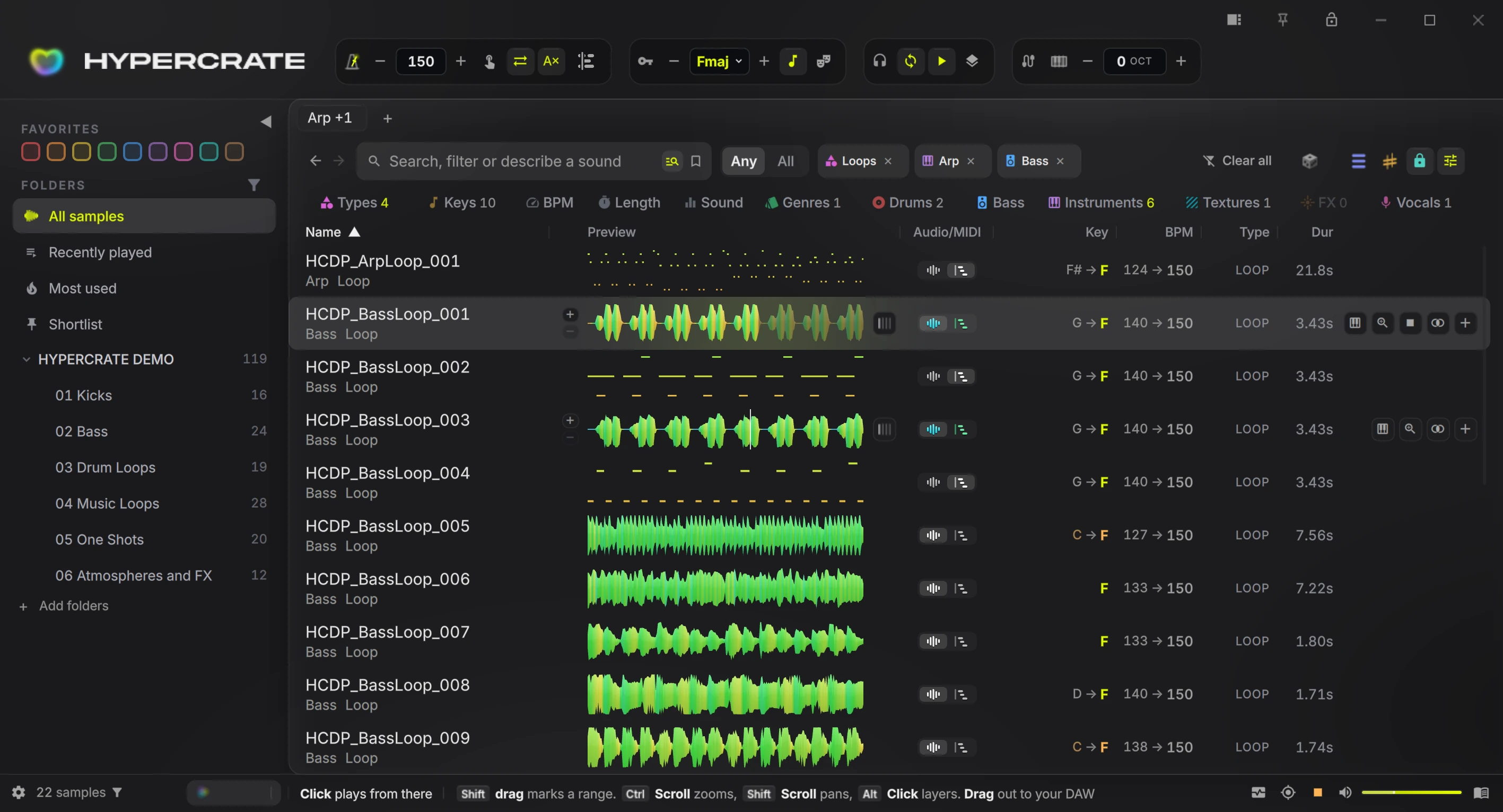
Type them into the bar at the top, or let the Analyzer plug-in in your DAW fill them in. Everything you play is matched to this bar.
Type a file name, or describe the sound, like “warm keys”, and it searches by what things sound like. The strip underneath narrows by type, key, tempo, genre and more.
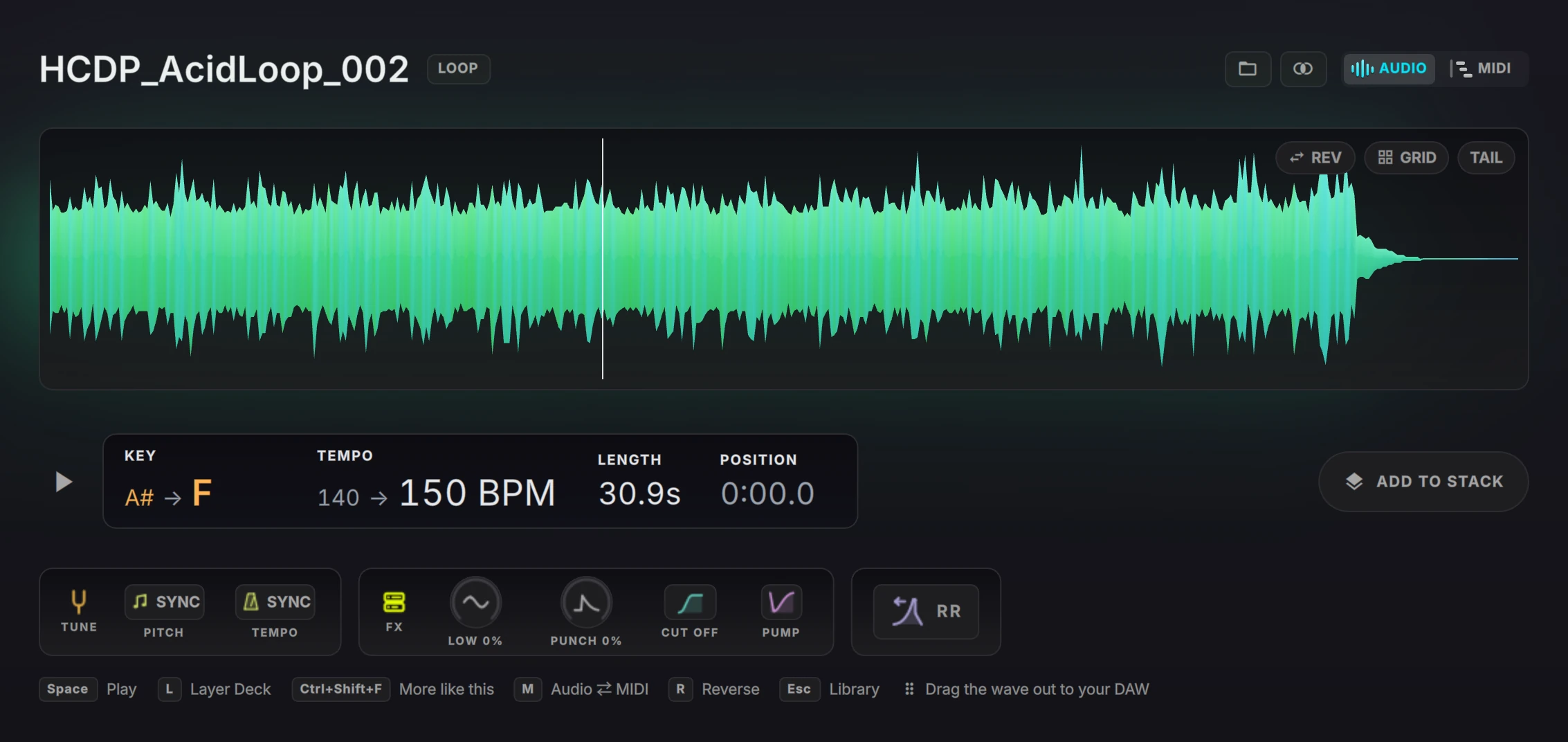
Each sample shows the key and tempo it was made in, then what it plays at for you. Here a bass loop in G at 140 plays in F at 150.
Your folders stay where they are on disk. Favourites, Recently played, Most used and Shortlist sit above them.

Made by Luke Bond, trance producer with 60M+ Spotify streams and releases on Armada Music and FSOE.
New VSL goes here
Featured vocal sample by KARRA
"Hypercrate is the best app I got in the last 10 years at least, never thought browsing through my hectic library of samples would be that easy, and the way it connects them, never seen before. This is a must for every producer."
Add your sample folders and drives. HYPERCRATE reads the key and tempo pack makers put in file names, works out the rest by listening, and leaves every file where it is.
Type what you hear in your head, such as "dusty lo-fi piano loop around 85 bpm". HYPERCRATE ranks your library by sound, and a key, tempo or type in the sentence becomes a filter.
Descriptions work in English only.
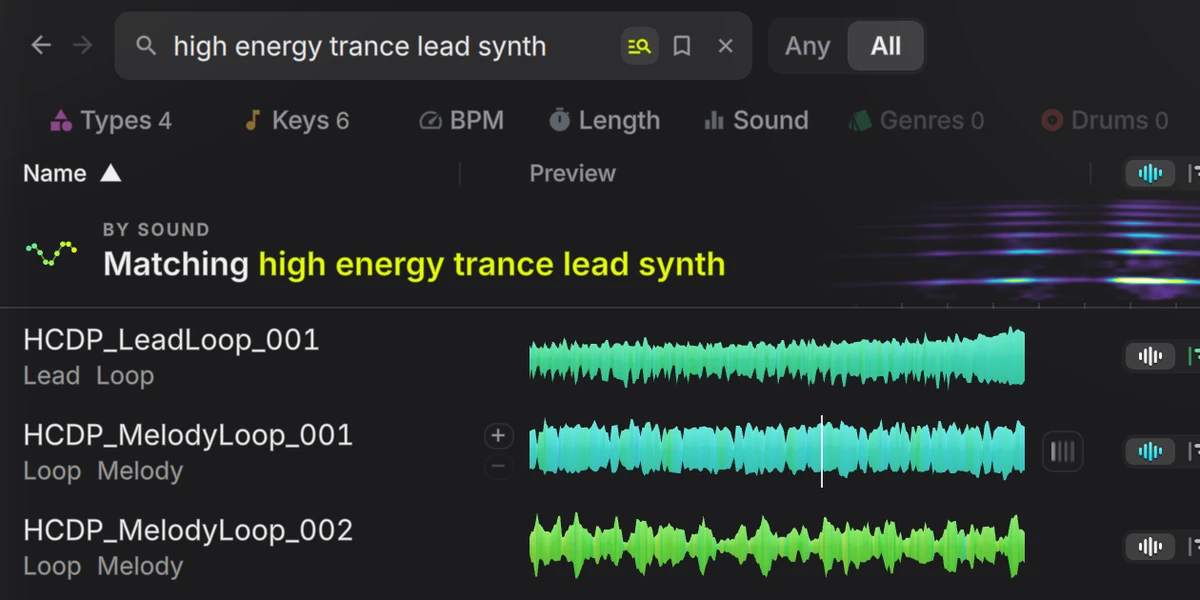
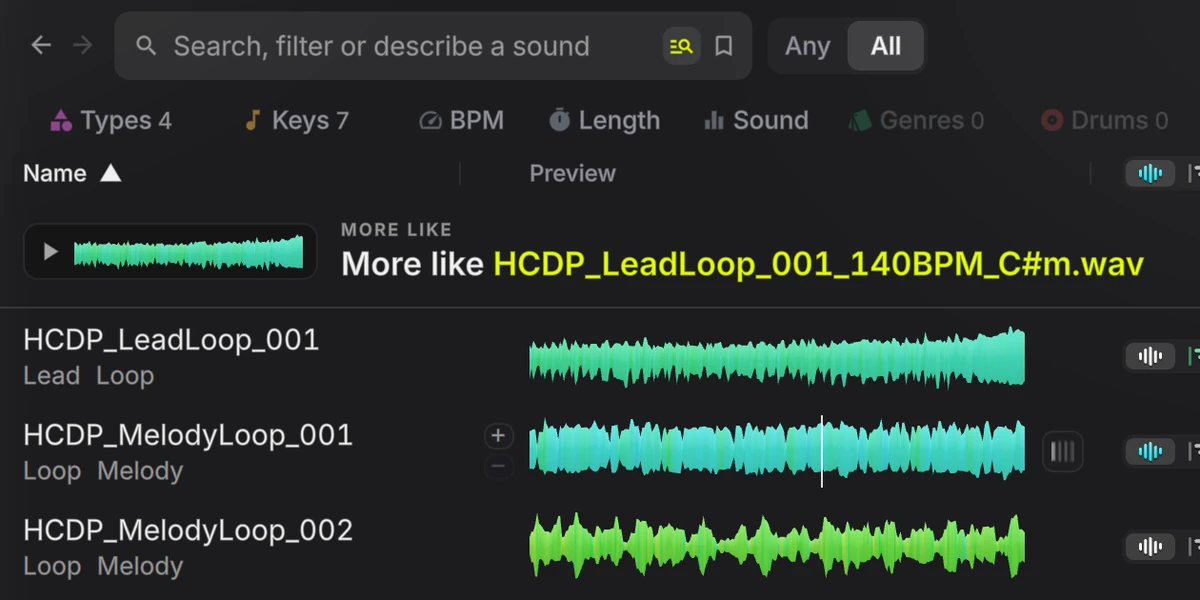
Right-click a sample and choose More like this. HYPERCRATE's own DSP engine takes over 200 measurements of every sound and reorders your library by how close each one is. Loops match loops, one shots match one shots, and a file that sits in several packs shows once.
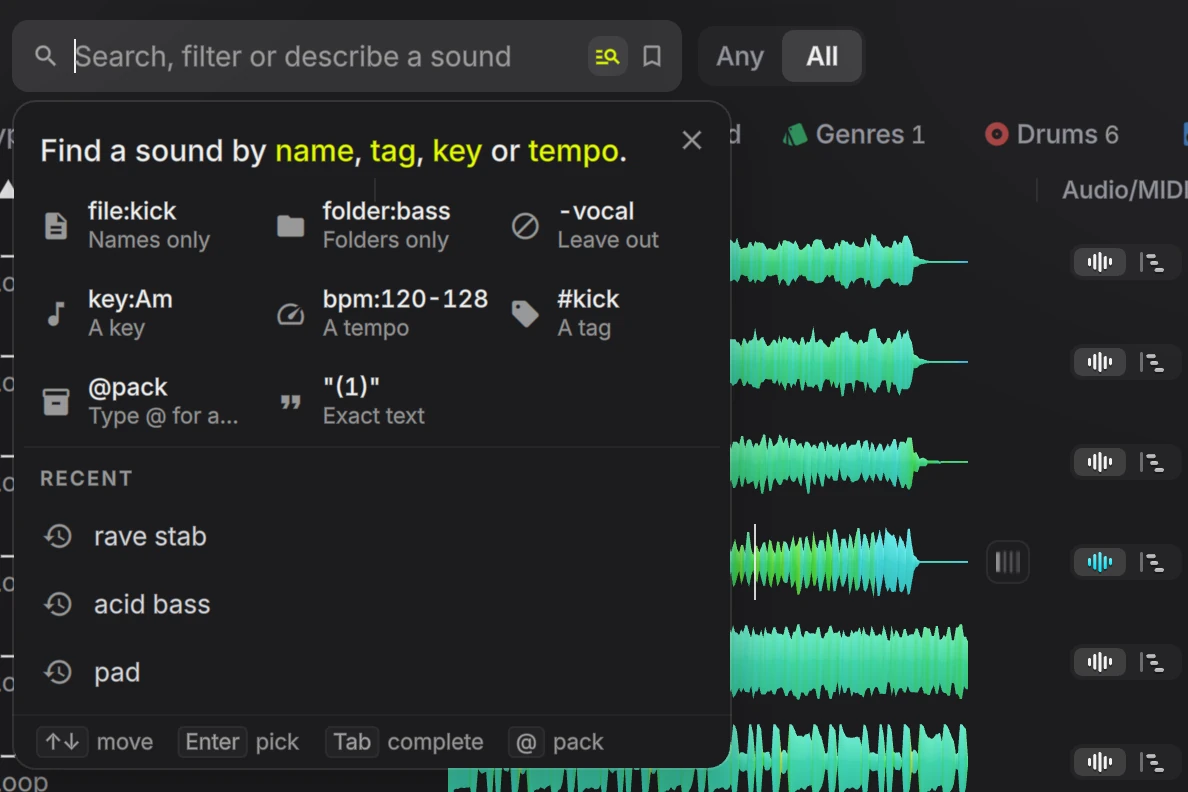
As you type, it suggests tags, packs, folders and keys, brings back recent searches and shows the best file matches. Put words in double quotes to match names exactly.
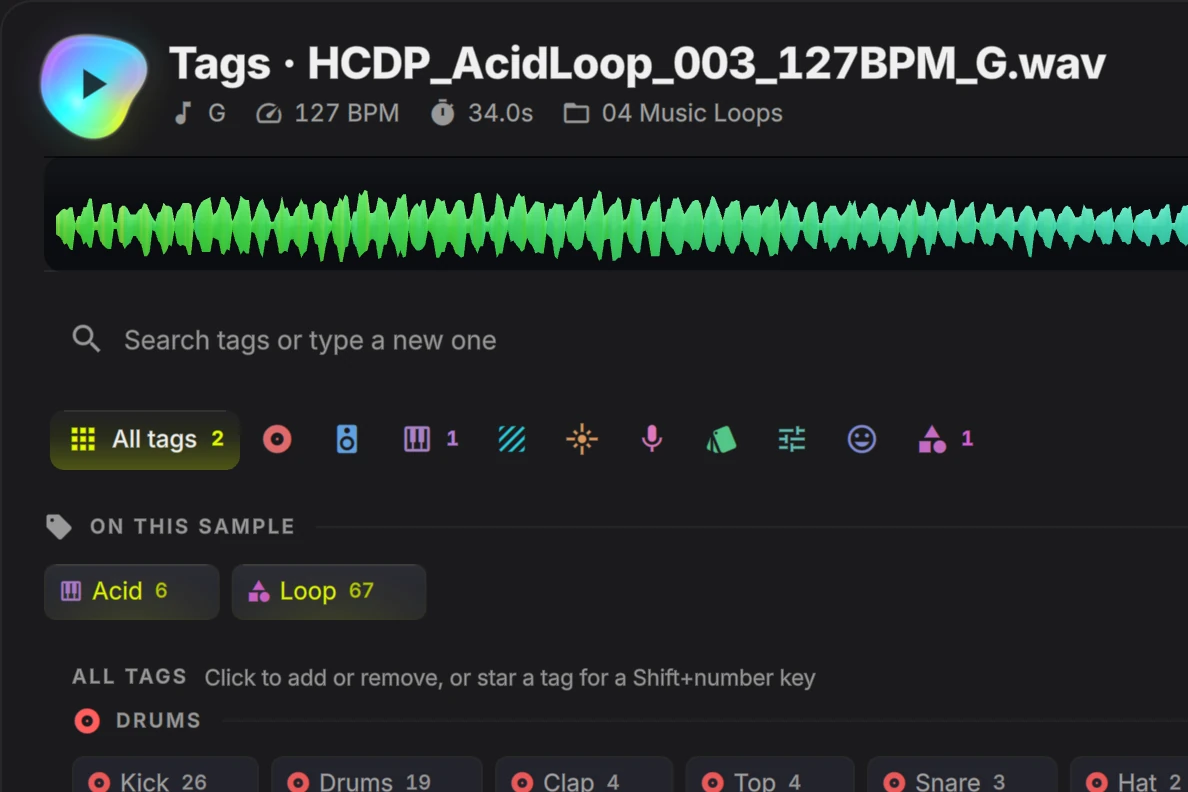
Tags come from the file and folder names your packs already use, matched against hundreds of instrument, genre, mood and processing words. Include or exclude any tag.
Switch on Learn what I like and Describe and Remix lean toward sounds that suit what you use and keep.
It scans your drives for sample folders, sets aside album rips and game audio, and shows a checklist before adding anything. A Splice library imports in place.
Add, move or rename files on disk and the library catches up. Moved packs keep their key, tempo, tags and favourites.
Scan the library or one folder. One copy stays, the rest are hidden, and Show hidden samples brings them back.
Set a key, tempo or type yourself and no future analysis overwrites it. Prefer the pack's own labels, or let it listen.
Rows appear as soon as files are added. Key, tempo and waveforms fill in behind you, at Low, Medium or High processor use.
Recently played, Most used, browser tabs, Back and Forward, Sort by Location, colour collections and favourites.
Type in your track's key and tempo, then switch on Sync key and Sync tempo. Every sample with a key is pitched to yours and every loop is stretched to your tempo as you listen, so you know whether a sound fits before it reaches your arrangement. Your original file never changes.
Bungee Pro audio technology © Parabola Research Limited.
Try it on your own library.Every feature for 14 days. No card needed.
The Layer Deck plays loops, one-shots and slices together in your key and tempo, so you can hear how sounds work as a group. Add a sound to try it, then press Keep to make it part of the stack without stopping playback. Switch to Remix and HYPERCRATE fills the lanes from your own library.
Remix builds a stack of up to 10 lanes from sounds already in your library. Press the Remix pad, or G, and every unlocked lane gets a new sample, picked to fit the others by key, tempo, rhythm and harmony. Lock the lanes you like and roll the rest. Each roll lands on the next beat, so the deck never stops playing while you find a starting point.
Lock the kick and the bass and roll the rest. Or roll one lane, or ask for something similar to what's in it.
Full builds a track idea from a recipe of loop lanes. Drums writes a groove from one-shots in Four on the floor, Shuffle or Broken beat, at Warm-up, Groove, Drive or Peak energy.
Tight sticks to the best fitting samples and Wild picks more freely. Full loops run 1, 2, 4 or 8 bars, Drums grooves 8 or 16 with fills.
Your last 20 rolls stay in the Rolls row. Click one to go back to it.
Remix picks from whatever the browser is narrowed to, a folder, pack, colour or tag. Right-click a folder and choose Remix this folder to start there.
The kick stays loudest, bass, chords, pads and leads pump under it, and everything but the kick and bass has its lows cut.
Fader, mute, solo, low cut, sidechain pump and tremolo on every lane, with rate, depth and pan. Reorder lanes while it runs.
Turn a lane into 16 steps with its own swing. On a one-shot lane the steps play the sample, on a loop lane they gate it. Drag the pattern out as a loop.
Try other samples in a lane's slot with its volume, low cut, pump and pattern kept, then Keep the one that fits.
Reload every lane with its order, mix and settings, in whatever key and tempo you're working in.
Step back through additions, removals, previews, reordering and lane mix changes. Pause the stack and it resumes in sync.
Drag out separate lanes, one per DAW track, or one stereo WAV mixdown with your balance, processing and mutes rendered in.
Flip a loop to MIDI. If its pack shipped matching notes, HYPERCRATE uses them. Otherwise it transcribes the loop on your machine and shows the result in a piano roll.
Clean tones and clear rhythms transcribe best. Dense or noisy material may need a few corrections in your DAW.
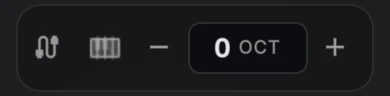
The MIDI preview controls in the header: send the notes to your own DAW instrument, pick a built-in voice, and shift the octave.
Open any sample in Inspect for a full-size waveform with its beat grid. Hear each change as you make it. Your source file stays exactly as it was.

Click the keys icon on any sample to open it in the Sampler, then play it from your computer keyboard or a MIDI keyboard and shape it as you play.
With a MIDI keyboard plugged in, a note plays the selected sample in the browser too.

Every command takes two keys of your choice, and two notes or controls from each MIDI device. Put play, replay and search on pads and keep your hands on your controller.

HYPERCRATE runs on its own and drags into any DAW. Three companion plug-ins, all included and all optional, tie it to your project. VST3 on Windows and Linux, VST3 or AU on macOS.
On your master bus
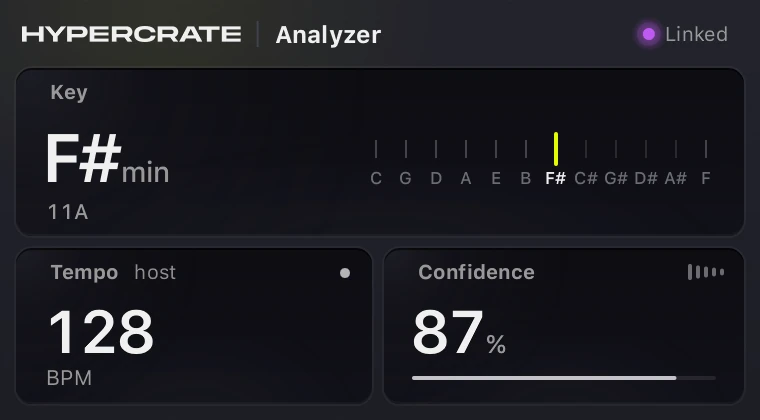
Reads your project's tempo, beat grid and key, including major or minor, and marks its best guess GUESS when a track is ambiguous. Change key mid-session and the browser follows.
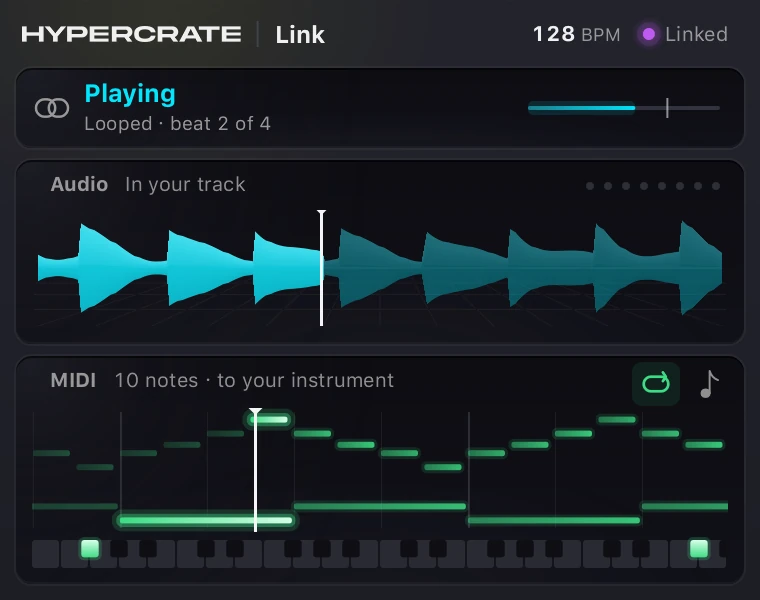
On an instrument track
Plays your auditions back through your project, delay compensated and in time, and plays library MIDI through your own instrument. Follows your transport, loop region and seeks. In Logic Pro, Link MIDI FX carries the MIDI.
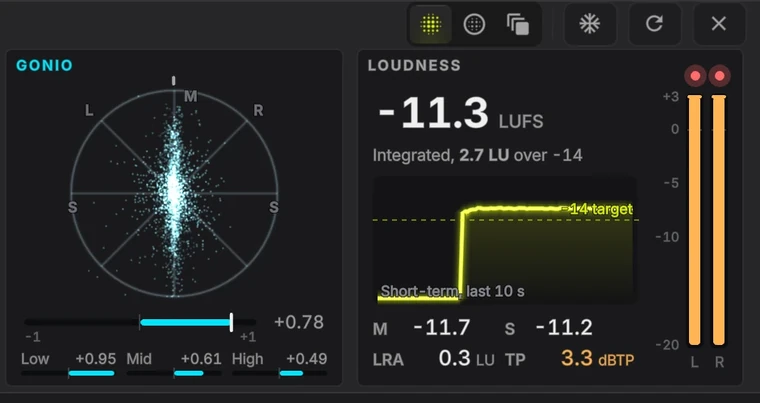
On any track or bus
Opens the full Meter Deck in its own window: spectrum, spectrogram, scope, goniometer, true peak and EBU R128 loudness. The audio passes through untouched.
None of them changes your sound. Analyzer and Meters only listen.
SUMMON floats over your DAW wherever you are working. Find the sound, hear it in your track and drag it in, without ever switching windows.
CtrlSpacefor example, or any keys you set in Settings
Choose a shortcut once in Settings, and SUMMON opens on top of whichever app you are in, your DAW included.
Search by name, or describe what you hear in plain words and SUMMON ranks your library by sound.
Descriptions work in English only.
Type @ to pick one pack or folder, or several, and the search stays inside them.
Auditions play in your key and tempo, at half or double time if you like, and can join a loop at the right bar.
Drag the sound straight into your arrangement, or its MIDI onto an instrument track.
Back and Forward step through what you searched, and one click clears every filter but keeps your words.
Size SUMMON on its own, from 50 to 200 percent. A second shortcut brings the full app above your DAW.
Sidecar turns HYPERCRATE into a narrow column at the edge of your screen, browser and Layer Deck included, so you can drag straight into your arrangement.
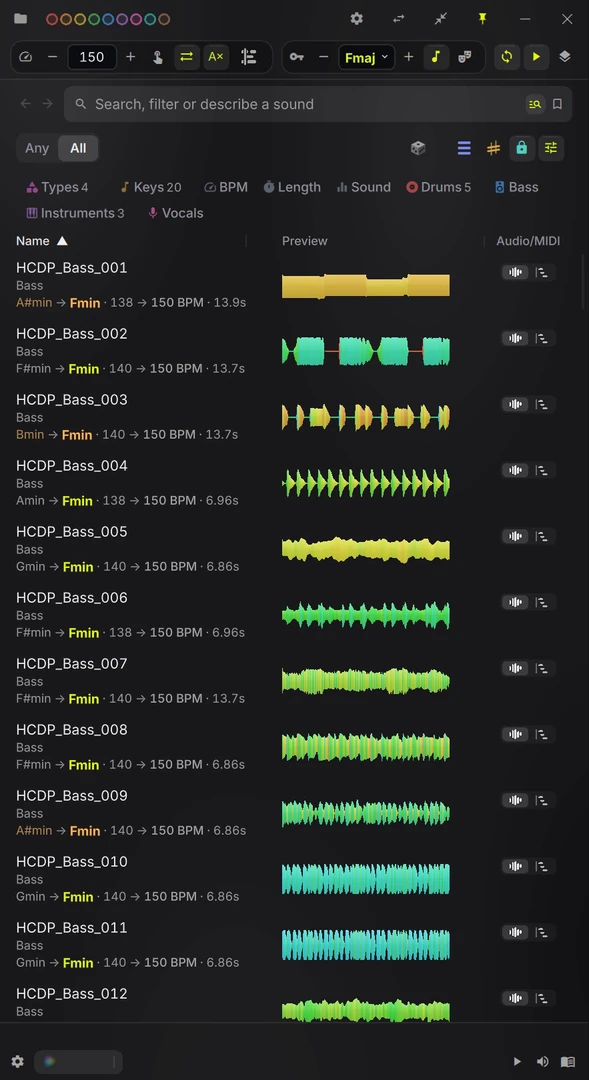
Dock Sidecar on the side where your DAW keeps its browser, and drag straight into your arrangement.
Plug it into your next session.The three DAW plug-ins come with the trial and the licence.
Spectrum, spectrogram, scope, goniometer, true peak and EBU R128 loudness follow whatever you play, drawn in Phosphor, Glass or Depth. With Link in your project, the Meter Deck reads the audition inside your DAW, and the Meters plug-in puts the same deck on any track or bus.

Momentary, short-term, integrated and loudness range, with oversampled true peak.
Hover the spectrum for frequency, nearest note and level, and tune a kick or sub to your root.
Integrated loudness and peak hold reset for every new sample, with a manual reset too.
Audio analysis, More like this and Describe run on your own computer. Your samples and search descriptions are never uploaded, and there's nothing to pay per search.
Auditioning and export leave source audio unchanged. Hiding a sample, or moving it to Recycle Bin or Trash, is a separate action you choose.
Off unless you switch them on, and even then they carry no audio, no library and no account details.
Sign-in, licence checks and updates use the internet. After sign-in it can work offline for up to 30 days.
I've been producing for nearly 20 years, and the slow part was never writing. It was finding the sample.
Every pack I bought made it worse. After a few years there were so many folders that choosing became the job.
Sometimes I needed a sound to start a track. Sometimes I needed the extra parts that get a track through its last 10 percent. Either way the search could take so long that I'd close the session.
Every sample had to be dragged into my DAW, repitched, stretched to my tempo, then auditioned. Then the same again for the next one. By the time a sound was finally in key and in time, the idea I was chasing had gone.
I had years of packs on a drive I barely opened. Finding the right sound cost more than the sound was worth.
So I built HYPERCRATE for myself, to hear my own library in key and in time without dragging anything in.
Then I gave it to other producers. Some are established artists, some are finishing their first track, and they all had the same problem. A lot of what's in the app now came from their feedback.
Luke Bond
One purchase gives you a permanent HYPERCRATE licence. New features are included for your first year, then renewal is optional.
The full app on your own library. Sign in with your email. No card or licence key needed.
Download, open, sign in with your email.
A permanent licence. It doesn't lock or expire, and there's no subscription.
The same £79, split into three. The full app from day one, and yours outright after the third payment.
30-day money-back guarantee.
Nothing more after the third payment. 30-day money-back guarantee.
Prices include VAT. Shown in your local currency at checkout.
Every licence includes an invite. Owners talk production there and follow what's coming in the next version.
HYPERCRATE is a native desktop app. A normal studio computer runs it. The heavy analysis happens once, when you import, not every time you open it.
Metal on macOS, Direct3D on Windows. Waveforms and the playhead redraw once per screen refresh, on 120 and 240 Hz displays too.
Interface scaling, list density from tiny to huge, a sidebar on either side, and a narrower window that fits beside your DAW.
Eight accent colours including a neutral white. Resize, reorder or hide columns, and it remembers where you left off.
Audition a random sound from your current results, on a shortcut you can change.
Loud samples don't drown out the quieter candidates while you browse.
Tray and menu bar options, launch with your computer, start hidden or stay on top of your DAW.
If your question isn't here, email hello@hypercrate.app.
A desktop app for Windows, macOS and Linux that puts every sample pack you own into one library you can search. Click a sample and you hear it in your track's key and tempo, so you know it fits before you drag it into your DAW.
You can also stack loops to try ideas, turn a loop into MIDI and find sounds by describing them. It's made by producer Luke Bond. See what it does.
It runs on Windows 10 (version 1809 or later) and Windows 11, on macOS 14.4 or newer with Apple silicon (M1 or later), and on 64-bit Linux desktops such as Ubuntu 24.04. Intel Macs aren't supported. You need 8 GB of memory, and 16 GB is better for big libraries.
The full list is under system requirements. The free trial is the surest test.
Point it at the folders and drives where your samples already are. A setup wizard can find them for you, or import a Splice library. Nothing is copied or moved. HYPERCRATE keeps its own index and leaves every file where it is, unchanged.
The first analysis runs in the background while you browse, and you choose how much of your processor it uses. After that the library keeps up as you add, move or rename files. It reads WAV, AIFF, FLAC, OGG and MP3, plus REX files on Mac and Windows and CAF Apple Loops on macOS.
Where a pack's file names include the key and tempo, HYPERCRATE uses them, because whoever made the sound knew. Otherwise it works them out by listening and shows how sure it is. A confident reading shows plainly, a suggestion is dimmed and marked ~, and a one-shot gets no tempo rather than a made up one.
You can set the key, tempo or type of any sample yourself, and no later analysis overwrites it. Matching to your track stays off until you switch on Sync key and Sync tempo, so the first time you hear a pack it plays as it was recorded.
No. HYPERCRATE runs on its own and you drag sounds into any DAW. Three optional plug-ins come with it. Analyzer reads your project's key and tempo so you don't have to type them in, Link plays your previews and library MIDI through your project in time, and Meters puts the Meter Deck on any track or bus.
VST3 on Windows and Linux, VST3 or AU on macOS. None of them changes your sound. More about the plug-ins.
Your audio doesn't. Your samples, the library index and all analysis stay on your machine. Searching by description or by similar sound runs locally too, so your searches are never uploaded.
The internet is used for sign-in, licence checks and updates. After you sign in it can work offline for up to 30 days, and that window resets whenever it's online. Crash reports are off unless you switch them on.
Download the app, open it and sign in with your email. There's no card and no licence key. You get every feature for 14 days on one computer, with your own library.
When the trial ends the app stops opening your library, but nothing is deleted. Buy a licence and your folders, tags and settings are as you left them.
No. One purchase gives you a permanent licence that never expires or locks, with every new feature for the first 12 months. After that you can renew for another year of new features at £29, tax included, if you want them. Bug fixes and security updates stay included either way.
One licence covers three computers at once, in any mix of Windows, macOS and Linux. You can free one up from the app's Settings or from your account.
Try it free for 14 days before you pay. If you buy and change your mind, refund it from your account within 30 days, or email us. A renewal has its own 30-day guarantee too.
No. I design the architecture and decide how each part works, and AI agents write much of the code inside that design. Every change goes through version control, automated tests and code review before a release ships.
My background is music production, and I've been technical since my teens, when I was building PHP sites. AI gives me the engineering capacity to build and maintain an app this size on my own. HYPERCRATE is the only software product I maintain.
Everything in HYPERCRATE 2.0. There's one edition, so the trial and the licence both get all of it.
Setup, search, the Layer Deck, audio to MIDI and the DAW plug-ins, one chapter at a time.
 New deep dive goes here
HYPERCRATE checks for a new version every four hours while it runs, and can download it in the background. Nothing changes until you restart, and it never closes your DAW.
Windows, macOS and Linux. HYPERCRATE verifies every update before installing it, and won't install one it can't verify.
HYPERCRATE installs with a full interactive manual. It opens in your browser, needs no internet connection, and always documents the version you have.
The same notes the app shows you before each update.
Windows, macOS and Linux. No card for the trial, and a 30-day money-back guarantee if you buy.
Every feature, on your own library. Sign in with your email. No card or licence key needed.
Download for WindowsNeeds a Mac with Apple silicon (M1 or newer) and macOS 14.4 or newer.
We'll send a few short emails with tips during the trial. Unsubscribe any time. System requirements
Didn't start? Download again. Need help? Read the manual.
It's a desktop app for Windows, macOS and Linux. We'll email you the download link, so it's waiting when you're back at your desk.
Your 14 days start when you first open the app, not now. We'll send a few short emails with tips during the trial. Unsubscribe any time.
